
4BIS InnovationsNLEN

Email signature iPhone

Published: 08.04.2026

Add Email Signature to iPhone


Step 1.
Go to Settings on your iPhone (Settings in English). This is the app with the gear icon.
In the list on the left, search for Mail.
If you found Mail in the list on the left press it.
A menu will open on the right.
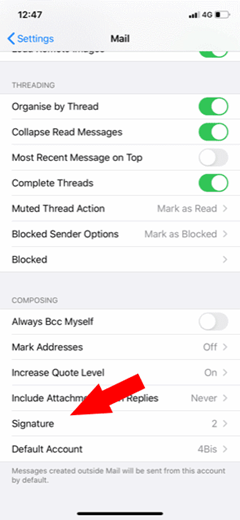
In that menu, scroll down until you see Signature.
Here you can change the signature.
The 4BIS Innovations team in Maastricht
10+people, one office in Maastricht

Got a platform that's outgrown itself?

We're a small team in Maastricht, not a call center. When you reach out, you talk directly with the developers who'd be working on your project, starting with a real conversation about what you're dealing with today.

MaxRensKieran
Max, Rens, Kieran and the rest of the team read every message.
Back to top